
Solution 02 / Detailing
Light Steel Frame detailing without rebuilding the model.
Turn the same LSF model used for design into panelized, documented project information. NodusCad connects member geometry, openings and connections to the drawings and lists needed by the detailing team.
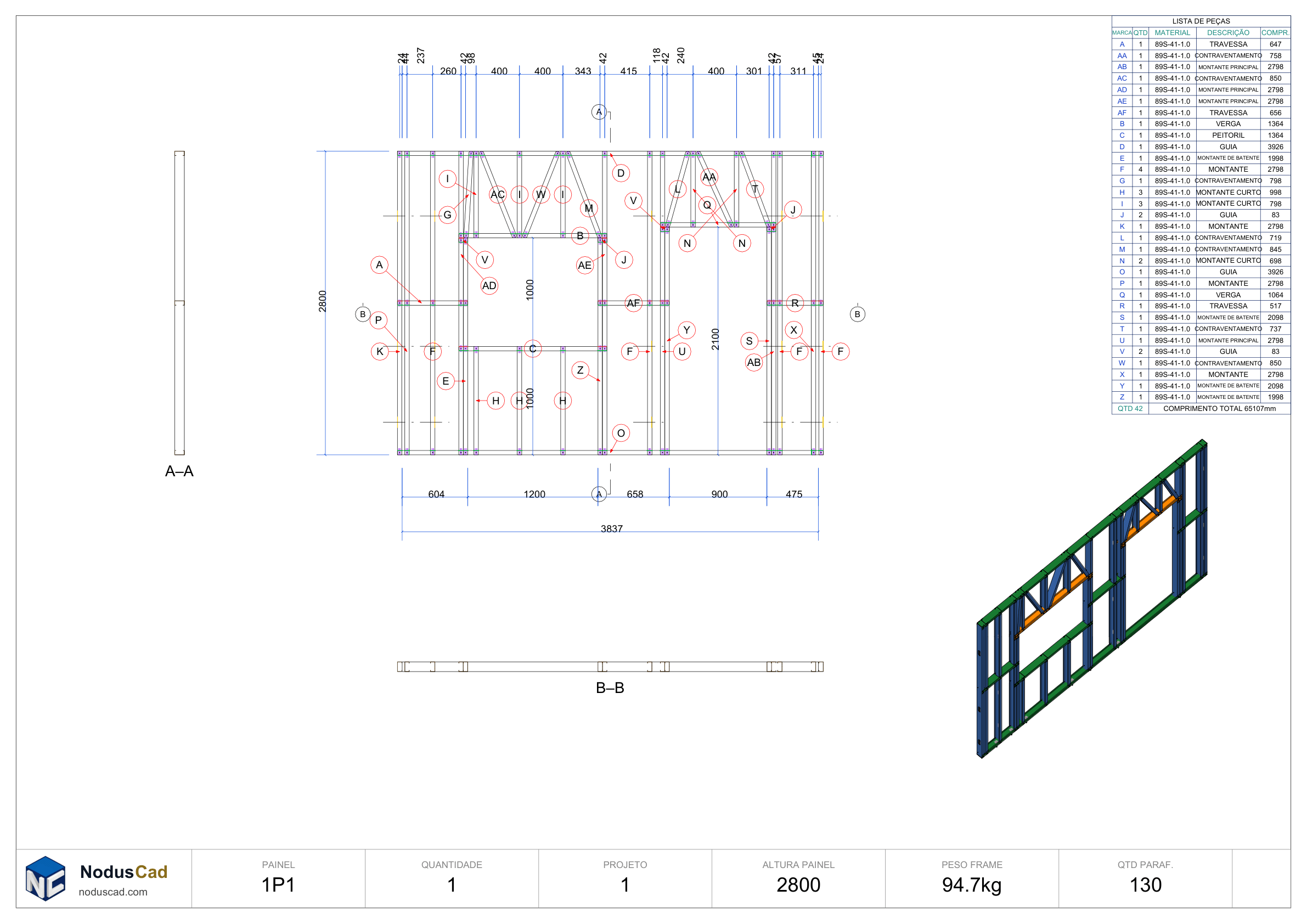
connected documentation
split, number and label
material information
drawing outputs
01 / Model-based detailing
Documentation that reads the structure, not a duplicate.
LSF detailing is where structural intent becomes buildable information. NodusCad works with the members already present in the project, so profiles, openings, panel divisions and connection details remain tied to the source model.
The result is a clearer path from building geometry to panel sheets, assembly information and material takeoff. When the model changes, the detailing team works from the revised source instead of coordinating an unrelated drawing copy.
Automatic framing
Generate studs, tracks and supporting members around walls, floors, roofs and openings using project-defined rules.
Resolved connections
Represent the cuts, notches, swages, dimples, holes and fixing locations that turn intersecting profiles into practical joints.
Panel organization
Split assemblies into panels, number members and keep identification aligned with the building model.
Generated documentation
Prepare panel views, dimensions, piece information and material lists for coordination and fabrication planning.
02 / Detailing sequence
From framed assembly to issued panel information.
A model-based sequence keeps members and documentation connected as the project is refined.
- 01
Frame
Generate and review the cold-formed members inside each assembly.
- 02
Resolve
Check openings, intersections, reinforcements and connection geometry.
- 03
Panelize
Define practical panels and keep member identification coordinated.
- 04
Document
Generate sheets, schedules and material information from the project.
03 / Detailing deliverables
A practical information set for the next team.
Use the project model to create coordinated outputs for review, assembly planning and exchange with other disciplines.
- Output 01Panel elevations and assembly sheets
- Output 02Member marks and panel identification
- Output 03Dimensions and piece information
- Output 04Opening and reinforcement geometry
- Output 05Bill of materials and takeoff data
- Output 06DWG, DXF and PDF documentation
04 / Questions
Light Steel Frame detailing FAQ
01What does LSF detailing include in NodusCad?
The workflow covers automatic framing, connection geometry, openings and reinforcements, panel organization, member identification, drawings and material information generated from the project model.
02Are panel drawings connected to the 3D model?
Yes. The detailing and documentation use the same source structure, which avoids recreating the project as an independent set of drafting lines.
03Can connection details be adjusted manually?
Yes. Automated results can be reviewed and overridden where the project requires a specific connection or local detailing decision.
04Is detailing included in the Free plan?
The Free plan includes modeling and detailing for 30 days. Paid plans add calculation and project exports.
Detail from the structure you already modeled.
Create a free NodusCad account and explore the model-based LSF detailing workflow.