
Solution 04 / Engineering
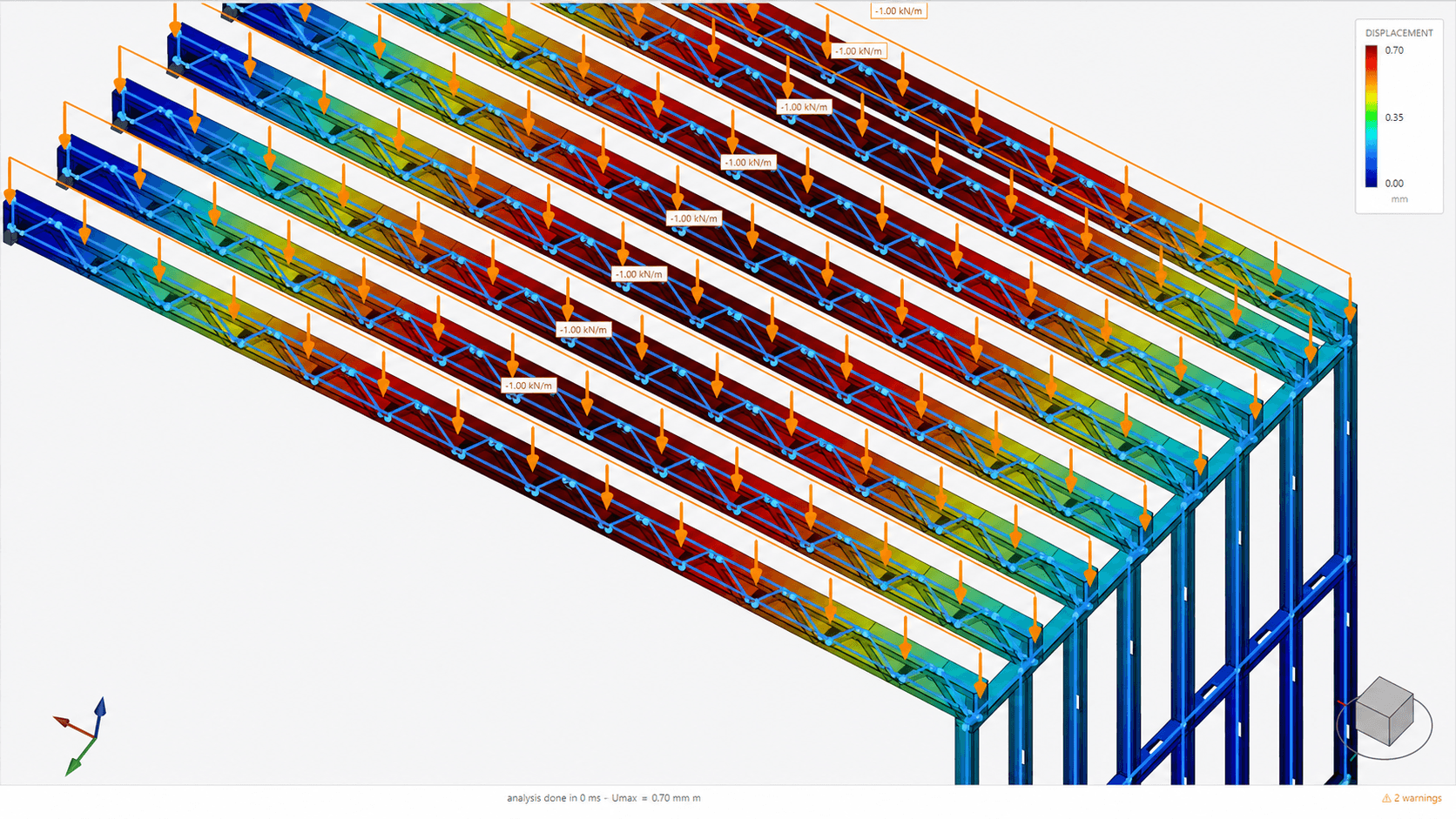
Structural analysis inside the Light Steel Frame model.
Keep calculation close to the geometry it evaluates. NodusCad lets engineering teams define actions and combinations, review model response and examine member checks without exporting a disconnected analytical copy.
project actions
analysis scenarios
model response
profile checks
01 / Integrated engineering
Calculation that stays connected to the LSF project.
Structural analysis depends on geometry, supports, materials, sections and applied actions. NodusCad keeps those inputs close to the building model, making it easier to understand which physical member or assembly a result belongs to.
Engineers can review displacements and member behavior in context, refine the project and continue into detailing from the same source. This continuity supports coordination, but it does not replace professional engineering judgment or the requirements of the governing design standards.
Model-aware inputs
Use the project geometry, cold-formed sections, materials, supports and connectivity as the basis for the analytical model.
Loads and combinations
Define project actions and evaluate the combinations relevant to the intended structural design workflow.
Visual response
Inspect deformed shapes and displacement results in relation to the actual Light Steel Frame structure.
Member review
Examine cold-formed member checks and use the results to inform profile selection and project refinement.
02 / Analysis sequence
A clear route from assumptions to reviewed results.
The calculation workflow keeps engineering inputs, results and physical members in the same project context.
- 01
Define
Review geometry, sections, materials, supports and structural connectivity.
- 02
Load
Apply project actions and organize the required load combinations.
- 03
Solve
Run the analysis and inspect the structural response in the 3D model.
- 04
Check + refine
Review displacements and member checks, then adjust the project as needed.
03 / Engineering review
Results tied back to the members they describe.
Use the integrated result views to support engineering review and documented project decisions.
- Output 01Applied load and combination cases
- Output 02Structural model response
- Output 03Three-dimensional deformed shapes
- Output 04Nodal and member displacement review
- Output 05Cold-formed steel member checks
- Output 06Project refinements in the source model
04 / Questions
Light Steel Frame analysis FAQ
01Can structural analysis be performed inside NodusCad?
Yes. Paid plans include the integrated calculation workflow for defining loads and combinations, reviewing structural response and examining member checks in the project context.
02What results can be reviewed?
The workflow includes model response, deformed shapes, displacements and checks associated with cold-formed steel members.
03Does the analysis use the same model as detailing?
Yes. Calculation and detailing are connected to the same source project, reducing the need to recreate the building as an unrelated analysis model.
04Does NodusCad replace a structural engineer?
No. The software is an engineering tool. A qualified professional must define valid assumptions, apply the relevant standards, review results and take responsibility for the design.
Calculate where the Light Steel Frame model lives.
Explore NodusCad free and choose a paid plan when your workflow requires structural calculation and exports.